A scenario is a shared design container in your Forma project that connects models from several software applications.
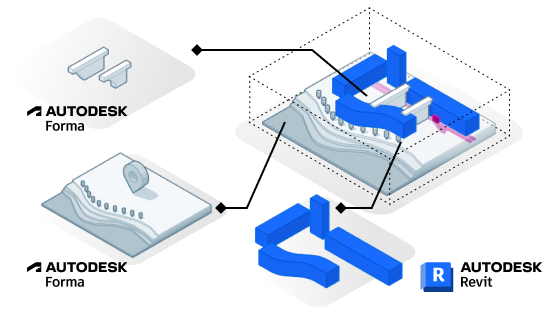
In a scenario, contextual data and models from other applications are represented alongside your active Revit model. In this way, scenarios solve common workflow challenges and unlock new capabilities:
- Visualize the full context of your model, with surrounding terrain, buildings, and other real-world data.
- Reference and coordinate models within a scenario, regardless of where you authored them.
- This eliminates the need to duplicate work or import and export files between applications. It also means you can use the best tool for a task without losing continuity.
- When you need to modify part of a design that originates in another design application, you can do the following:
- Convert a model for editing in your current application.
For example, suppose the scenario includes a site created using Forma Site Design. Moving into Revit for detailed building design, you want to adjust the terrain around the building. You can convert the terrain to a Revit element (a toposolid) to make the desired changes.
This capability helps minimize rework as you move between design applications.
- Open the model in the originating design application.
For example, suppose the scenario includes a site created using Forma Site Design, and includes multiple building proposals. Open the model in Site Design, so you can quickly make modifications to the building proposals. Then quickly move back to Revit to receive the updated building proposals and continue detailed design.
- Convert a model for editing in your current application.
- Understand the environmental impacts of your design within its real-world context.
- Forma analysis tools can use all data available in the scenario when generating results.
Connecting your model to a scenario is a prerequisite for using Forma tools.
Current limitations
As part of the Forma Connected Client Tech Preview, the following limitations apply to scenarios:
- Currently only Forma-native models and Revit models can be connected to a scenario. The list of supported model types will expand over time.
- You can connect a model to one scenario. In the future, it may be possible to connect a model to several scenarios so you can explore design alternatives in parallel.
- You can connect the active Revit model to the scenario. To connect several Revit models to one scenario, open each model separately and connect it to the same scenario.
- Editing functionality for scenarios is currently limited and will expand over time.
- If you add a Revit model to a scenario and then open the scenario in Forma Site Design, the Revit model displays using an outer shell representation. To improve performance, some categories of Revit elements are not included in the representation, such as MEP equipment and structural members. If the model consists of only those excluded categories, no Revit model displays in Site Design.