Run a Forma microclimate analysis to evaluate perceived temperature on site, combining sun hours, daylight potential, and wind exposure with localized weather and climate data.
Before performing a microclimate analysis, prepare the model to access Forma tools.
To perform a microclimate analysis
- Open a view (a 3D view or a site plan) that displays terrain and relevant contextual data, such a surrounding buildings.
- Click Analyze tab > Forma Analyses panel >
 (Microclimate).
As an alternative, you can click Analyses & History and, for Run analysis, click Microclimate.
The Microclimate panel opens, and the analysis results display in the view. By default, it shows thermal comfort for a 150 meter circle at the center of the terrain. Scroll down the panel to see thermal comfort details and local weather data.
- (Optional) In the Microclimate panel, adjust settings to explore more analysis results.
- Analysis area: Click Place circle, and click in the view to place a circle around the model.
The circle defines the area to be included in the analysis. Use the slider to adjust the radius of the analysis circle.
- Month and time of day: Choose the desired month and time of day for the analysis.
- Air temperature: Click a bar in the chart for analysis of the selected dry bulb temperature to investigate less common situations.
- Wind: Click a segment of the wind rose for analysis when the wind comes from that direction.
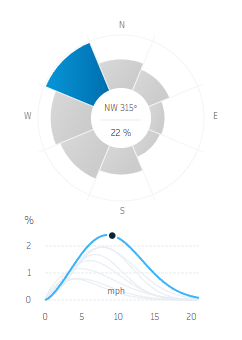
The results update whenever you adjust settings or modify the design. For example, change the size and shape of a building mass, and instantly see how the change affects perceived temperature.
When you switch to other open Revit models while the panel is open, the analysis results are displayed and settings are maintained for each model.
- Analysis area: Click Place circle, and click in the view to place a circle around the model.
- To stop the analysis, close the Microclimate Analysis panel.