Projected views inherit all its properties from the parent. When the properties of the parent view change, the corresponding properties on the projected view also change.
- Click anywhere inside the selection boundary to move to a new location.
- Select the Scale ratio in the contextual panel to scale the base view.
The projected views inherit the scale from their parent view.
Note: If the projected views are changed, they no longer inherit the settings of the base view. - In the contextual panel, edit the properties of the component.
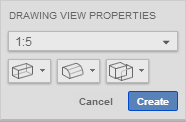
- Hidden Lines: Select On or Off from the drop-down list to display of hidden lines within the base view to be modified.
- Tangent Edges: Select Full length, Shortened or Off from the drop-down list to display of Tangent edges within the base view to be modified.
- Interference Edges: Select On or Off from the drop-down list to display of Interference edges within the base view to be modified.
- Click Create to accept the drawing view.