
Issue:
Can parts be turned only at 90 degrees, 180 degrees, and 270 degrees in Auto Nesting of Inventor? Is free turning possible to get better results?Causes:
- Default rotation by 90 degrees, 180 degrees, and 270 degrees is possible in Nesting
- Default degrees are set to cut in sheet metal parts with specific grinding on the surface
- Rotation was set to default 90, and so on, to not have diagonal grinding on metal parts by accident.
- For automatic placing, part degree can be changed by deviation of Standard rotation
- Deviation and increment settings are controlled in two different places:
- At the material level (Process material library)
- The source/parts level (Nest properties).
- Material settings must allow deviation and increments for the parts to be able to deviate from allowed rotations.
Solution:
Try the following:- The elements can be changed manually in the orientation column of the desired part in the Edit Nest option.
- For automatic placing parts, changing the deviation of Standard rotation in material:
- Press 'Process Material Library' in the Manage menu of the Nesting tab
- In the opened window, locate the material of the part that needs to change angle of the Nesting Study
- Select it and go to the Nesting tab:
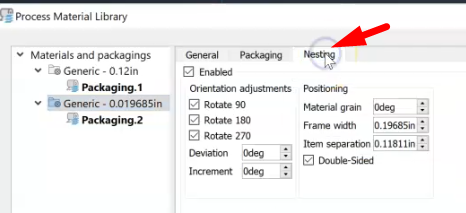
- Change the 'Deviation' degree and select the Rotate option on which deviation should change the angle (90, 180, 270, or all of them).
- Press 'OK' to save settings for this material
- Recalculate Nest.
Note: Allowable deviation from the presets; for example - entered 10, a 90-degree orientation is allowed to deviate between 80 and 100. (Check source: Working With Nest Properties)