
Export tenant property history
As a Tenant Administrator, you can export a complete history of all tenant property changes made in your Upchain tenant. This feature provides an audit trail of configuration changes for compliance and tracking purposes.
To export the tenant property history
In the Administration section, click your profile menu in the bottom-left corner of the page.
Select Export history.
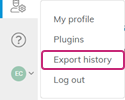
The system generates and downloads a CSV file containing the complete history of all tenant property changes, including:
- Property names that were modified
- Previous and new values
- Date and time of each change
- User who made each change