
Product Manufacturing Information (PMI)
Product Manufacturing Information (PMI) is data added directly to a 3D CAD model. It includes 3D annotations, GD&T (geometric dimensions and tolerances), and other manufacturing information. PMI can be computer-readable (semantic) or graphical. The practice of adding PMI to create a fully defined digital model is known as MBD (model-based definition) or DPD (digital product definition). The fully defined digital model becomes the single source of truth.
In Fusion, you can create PMI directly on your model in the Design workspace, so downstream manufacturing and inspection workflows can read it directly. This provides a mechanism for specifying and reusing tolerances without referring to a separate 2D drawing. You can also open designs with PMI created in other CAD applications and view or convert that PMI.
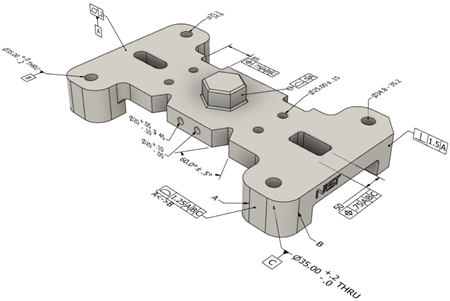
Example of PMI in Fusion.
Create PMI
Fusion supports two types of PMI notes, available from Utilities > Create PMI on the Design workspace toolbar:
- Hole/Thread Note: Captures specifications for a hole or boss feature. This includes diameter, depth, tolerances, thread details, and counterbore or countersink dimensions.
- Note: Captures general annotations such as instructions, references to standards, or other information, attached to a point on the model.
PMI you create appears under the PMI node in the Browser. You can edit it at any time. If multiple PMI items relate to the same geometric feature, they are grouped together. When you select a PMI item in the Browser, the associated feature is highlighted on the canvas.
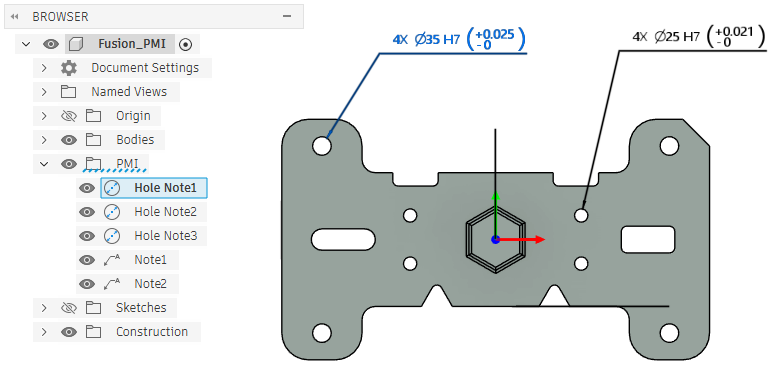
Hole Notes and general Notes created in Fusion.
Downstream workflows
For threaded hole and boss features, downstream workflows in the Manufacture workspace can use PMI directly for automated hole machining and inspection.
Imported PMI
You can open designs with PMI created in the following CAD applications:
Autodesk Inventor files (
*.iam,*.ipt)CATIA files (
*.CATProduct,*.CATPart)NX files (
*.prt)Note: For NX files, semantic PMI is available only for linear dimensions.STEP (AP 242) files (
*.ste,*.step,*.stp)
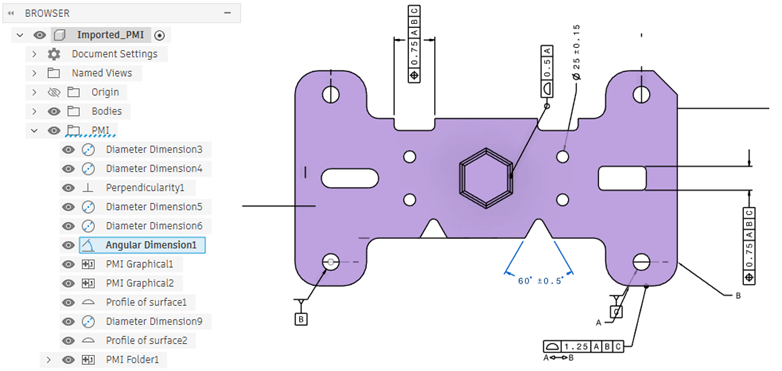
PMI imported from another CAD application.
If you change a design in Fusion, the model geometry changes but the PMI does not. The PMI becomes out of date. This is shown by a warning icon in the Browser. The graphical PMI on the canvas also changes color from black to orange:
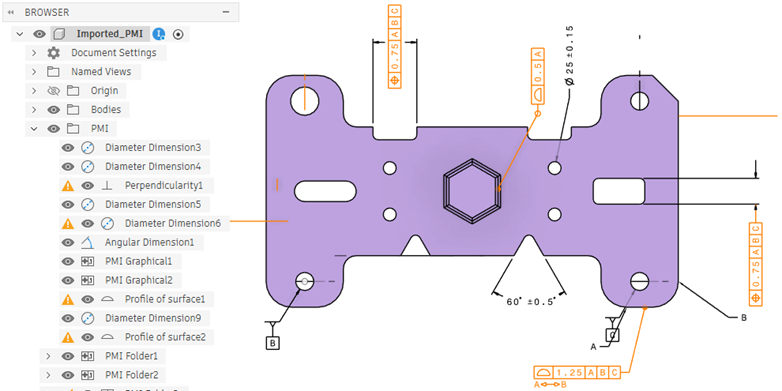
To fix these warnings:
- Undo the changes you made to the design in Fusion, or
- In the original CAD application, update the original file and then upload it again to Fusion.