Text callouts with or without leader lines provide explanations about selected features. Callout rules update callouts dynamically if the associated feature changes. You can insert callouts in model space and paper space. To configure callouts, see To Configure Callouts.
- Click Home tab
 Annotation panelInsert Callout.
- Select the features to which to add callouts. If the selected feature contains other features, you are prompted to specify the feature for which to insert the callout block.
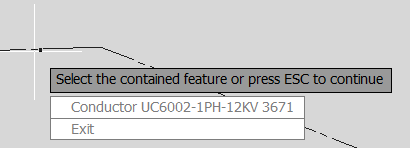
- Do any of the following:
- Press ESC to specify the container.
- Click a contained feature from the list.
- Click Exit to bypass further options and insert the callout.
- The following options are available:
- Gallery: Select a callout from the Gallery.
- Leader: Enter l to add a leader line with the callout.
- Rotate: Enter r and specify two points to define the rotation angle.
- Scale: Enter a scale value.
- Click to position the callout.