Use the Primary Voltage and Secondary Voltage lists to set the Voltage attribute value for all new primary and secondary conductors. Use the Status list to set the Status attribute value for all new features. These values apply to features created using the following methods:
- Manual creation using the ribbon, Feature Library, Model Viewer, or command line.
- Automatic creation during analysis operations and when resolving validation issues.
- Creation during import or conversion.
Primary Voltage and Secondary Voltage values are also applied when you change the conductor model.
- Click Home tab
 Electric Underground or Electric Overhead paneldown arrow to display the default models palette.
 - Set any of the following values:
- Primary Voltage—Sets the voltage for all new conductors with an ID_CONDUCTOR_TYPE attribute value of primary conductor, feeder conductor, and transmission conductor.
- Secondary Voltage—Sets the voltage for all new conductors with an ID_CONDUCTOR_TYPE attribute value of connection conductor, internal conductor, service conductor, secondary conductor, and street light conductor.
If the conductor has any other value setting for the ID_CONDUCTOR_TYPE attribute, the Primary and Secondary Voltages values do not apply.
- Status—Sets the Status for all new features.
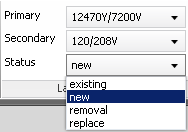
The Primary Voltage, Secondary Voltage, and Status values apply to features created manually, automatically, or by import.