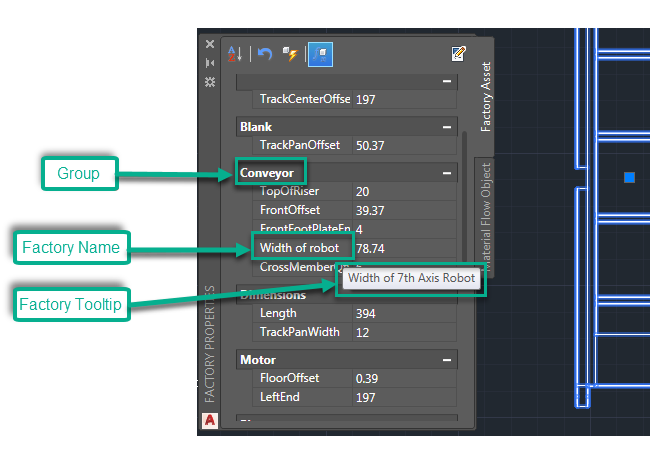
Create a Factory Name, group, custom tooltip, and sort columns..
Having the flexibility to customize key parameters enables you to better organize the parameters of your asset instances in a layout. When you customize your key parameters in the Inventor Factory utility, these customized asset definitions are updated in AutoCAD Factory, Navisworks Factory, Vault Factory, and Inventor Factory through the
Update Assets
 command in the
Factory ribbon.
command in the
Factory ribbon.
Editing Key Parameters in Inventor Factory
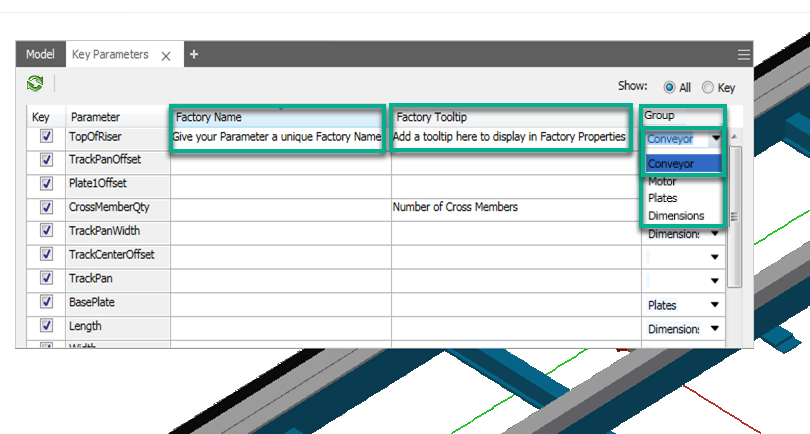
Customize your Key Parameters in Inventor by:
- Assigning a customized Factory Name to your key parameters.
- Creating your own Factory tooltips that display in all Factory Properties palettes.
- Creating customized groups to better organize your parameters.
- Selecting to show All parameters or only Key parameters of your asset.
Save all custom information entered into the Key Parameters dialog by clicking Finish. Only Key Parameters are visible when the asset is placed in your layout.
There are three columns that control your Key Parameters dialog in Inventor Factory:
- Factory Name
- Factory Tooltip
- Group
Customized properties display in all of the Factory Properties palettes.
Example of key parameter updates in the AutoCAD Factory Properties palette: