| Minimum Software Version Requirements | |
|---|---|
| Civil 3D® catchment support | Civil 3D® 2022 |
| Civil 3D® catchment runoff properties support | Civil 3D® 2026.2
InfoDrainage for Civil 3D: 2026.4 |
Civil 3D® Import from InfoDrainage
InfoDrainage inflow types Catchment Area and Green Roof will be imported as Civil 3D® Catchments. The imported catchments will be added to a catchment group named "ID_ <imported phase name > ".
The connection of the inflow and connected item will be maintained. The imported catchment will reference the appropriate imported structure and network.
The runoff coefficient and time of concentration for the catchment will be maintained if the InfoDrainage runoff method contains these properties. The InfoDrainage runoff properties will also be maintained for the catchment if they are supported by Civil 3D®.
Base Flow and Hydrograph inflows will not be imported, although they will be restored if the imported design is subsequently exported to InfoDrainage.
Civil 3D® Export To InfoDrainage
Civil 3D® Catchments will be able to be exported to InfoDrainage. If the catchment was brought from InfoDrainage then the Runoff Details will be restored unless changed in Civil 3D®. The properties of the catchment will also be taken from Civil 3D®.
The connection of the catchment and the structure will also be maintained.
If the catchment is newly created in Civil 3D® then all properties and connection will be taken from Civil 3D®.
If the catchment is not connected to the network but its area overlaps a junction or stormwater control the catchment will be connected to that structure. If the catchment is attached to a structure created as part of a multi-point connection the catchment will be connected to the upstream junction on export.
Civil 3D® Catchment Runoff Properties
For InfoDrainage Catchment Area inflows, the Civil 3D® catchment runoff properties are imported to and exported from.
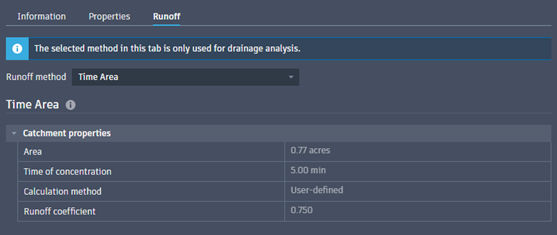
Certain behaviors or limitations may apply depending on the runoff method:
| InfoDrainage Runoff Method | Civil 3D® Runoff Method | Notes |
|---|---|---|
| Time of Concentration | Time Area | Not to be confused with the Time/Area Diagram runoff method only available in InfoDrainage. |
| SCS | Soil Conservation Service (SCS) | Percentage Impervious and Pervious Curve Number: properties are not supported in Civil 3D®; if the Composite Curve Number is modified in Civil 3D® prior to export then in the exported inflow these properties may be overwritten to preserve the Civil 3D® value. |
| SWMM | EPA SWMM | Infiltration Method: Constant value in InfoDrainage is not supported in Civil 3D® ; catchments are imported as Green Ampt with Suction Head and Initial Deficit set to 0. |
| SBUH | Santa Barbara Urban Hydrograph (SBUH) | Percentage Impervious and Pervious Curve Number: behaviour is the same as for SCS; see above. |
| Modified Rational (Static) | Rational and Modified Rational Method | Calculation Method: InfoDrainage supports Modified Rational only; catchments using Rational are exported as Modified Rational with Duration of Peak set to 0. Duration of Peak: multiple values are not supported in Civil 3D® ; catchments are imported using the first value only. If the catchment is exported back to InfoDrainage, then the additional values are restored. |
| Time/Area Diagram, FSR, FEH, ReFH, ReFH2, Green Roof, Laurenson, Foul | Unsupported in Civil 3D® | Catchments are imported as the default Time Area runoff method when the InfoDrainage runoff method is not supported in Civil 3D®. The original InfoDrainage runoff properties are imported to the Extended Data properties set for the catchment. If the catchment is exported back to InfoDrainage then the Extended Data values are used, unless the Civil 3D® value has been changed from Time Area. |