The Wind simulation feature simulates a wind flow around a structure, and generates wind loads automatically.
This feature is especially useful with structures that have a complicated geometry, and for which it is usually difficult to define the right wind loads.
This wind simulation technology acts as a wind tunnel, and enables you to visualize colored pressure maps on your model in order to understand the effects of the wind even with complicated structures.
The results of this simulation can be used for further analyses, or to verify a typical approach based on specific codes.
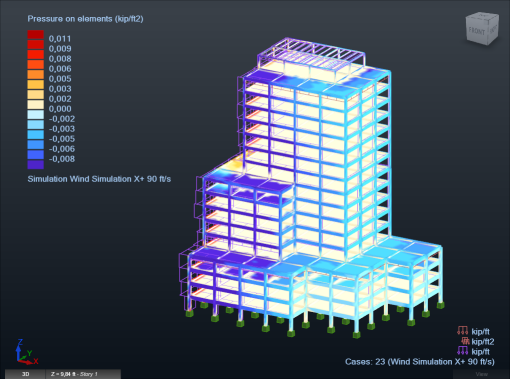
React Structures uses the Autodesk Simulation CFD technology to simulate the air flow around your structure.
The program uses the flow simulation results to trigger the automatic load generation at the best moment. However, you can click the Generate Loads now button to stop the simulation and start the load generation process immediately.
To let the program decide of the best moment to generate the loads, you can set a convergence threshold for the deviation factor. When the simulation results converge and this threshold is reached the loads are generated automatically.
Several wind parameters are available such as the wind direction, wind velocity, and wind pressure. You can also specify the ground level, and the elements that are exposed to the wind.
By default, the wind direction is set in the global coordinate system and in the positive X direction.