Use the Wind Profile tab to create a variable wind profile.
Note: The wind loads created using a custom wind profile are tagged as "variable" in the list of loads, e.g. "Wind Simulation X+ 20m/s
(variable)".
Access
- Click Loads
 Wind and Snow
 Wind Simulation.
Dialog Elements
- Wind profile: Graphic elements
-
To create a wind profile, click anywhere on the graphic curve to create a point, and then drag this point to the required coefficient.
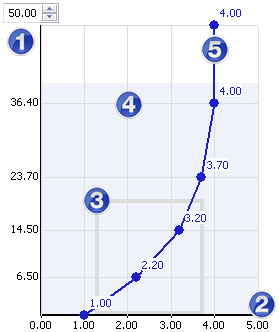
-
Height
Adjusts the height of the wind profile curve.
You can expand the curve beyond the virtual wind tunnel range.
-
Velocity factor
The multiplying factor which refers to the velocity of the base wind.
-
Building outline
Shows a summary representation of the building size.
-
Wind tunnel (light blue area)
A graphic representation of the virtual wind tunnel.Note: The size of the virtual wind tunnel is set automatically, based on the size of the building. If the wind profile is bigger than the size of the wind tunnel, the simulation takes into account the wind loads in the inner limits of the wind tunnel only.
-
Wind curve
A graphic representation of the wind profile in a virtual wind tunnel.
-
Height
- Name
- Enter a Name for the wind profile that you want to save.
- Once saved, the profile name is added to the drop down list which allows you to select a saved profile.
- <Load Wind Profile>
- Contains the list of wind profiles if you created any.
- Reset
- Restores the default wind profile.