
Get started with a new electronics design
When you launch Fusion it opens in Home, where you can create a design or open an existing design.
In Home, click New. Alternatively, on the Application bar, click File > New.
In the What do you want to design? dialog, select Electronics Design.
Click Create New.
An electronics design is created, within which you can create a schematic, a 2D PCB, and a 3D PCB.
In the Common tab, click:
New Schematic
 on the left to start with a blank sheet.
Reference a Schematic
 to link to an existing schematic.
New PCB
 to start from scratch.
Reference a PCB document
 to link to an existing PCB.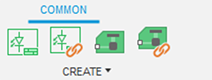
Click Save to give the design and related documents a name.