Hold parts in place and mitigate thermal effects during printing
Supports are necessary in various different methods of additive manufacturing to help keep a part's distortion due to thermal effects to a minimum, allow the deposition of overhanging shapes, and provide general fixation and rigidity during the print process. With suitable configuration, supports could even be incorporated into the part's design where they perform as mounting points, for example.
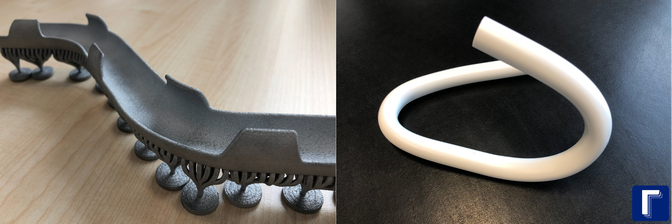
On this pipe forming tool with bar support bouquets and bottom plates, the supports remain on the part. (Part and image: Gramm UG, http://blogs.autodesk.com/netfabb/2018/09/27/gramm-story/)
Support types in Netfabb
Netfabb offers a fully comprehensive suite for generating, applying, and editing supports. It uses and combines three main shapes of supports: bars, polylines, and volumes.
| Type | Description |
|---|---|
|
Bar supports |
Bar supports connect two points, one on the part, and the other one either somewhere else on the same or a different part or on the platform. As such, bars only support single points. Bars may be created as volume-less single-path entities or solid voluminous ones. Bars may also be connected into bouquets that merge multiple bars into tree-like structures which terminate in single trunks at their bottom end. |
|
Polyline supports |
Polyline supports are akin to fences. They support a part along a line that are formed by connecting anchors which are set either manually or generated automatically by cluster detection. Polyline supports may come in three main variants, a thin but otherwise featureless wall, the same again, but with holes to resemble a wire-fence-like structure, and a massive wall with a defined thickness beyond that one of a single toolpass. |
|
Volume supports |
Volume supports are hollow, regular structures similar to pipes with a square cross section. To create volume supports, you must define at least three anchor points to form an area that can have volume supports applied. Line types, structure properties, fragments and connection types can be adjusted. |
Parametric supports vs. support meshes
By default, Netfabb handles supports parametrically: Their meshes are only visualizations of the values used to generate them until they are actually needed in steps such as exporting or labeling.
This allows a more flexible work with supports:
- They can be recreated with fewer or no manual steps whenever an arrangement or packing changes.
- They can be composed of meshes that would technically be unsuitable for printing like regular parts, and as such allow for more freedom in matching your part's support requirements with your chosen printer technology's capabilities with regards to slicing and generating toolpaths for contours and infill, for example.
To help distinguish parts from supports, Netfabb handles parametric supports as attachments colored in blue by default.
Not all file formats understand the difference between part mesh and support mesh. Currently, only the 3MF format knows the difference, although it does not store the procedures used to generate the supports.
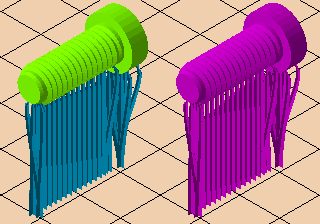
Left: Dedicated support mesh ("parametric supports") is displayed in light blue. Right: Regular-mesh supports show up in the part's (or assembly's) display color or its own actual color (not shown).
Creating supports in Netfabb
To create supports, Netfabb employs its support module, available in subscription tiers Premium and higher. Certain machine workspaces make some of its functionality available at the Standard subscription and even free the Netfabb, too. For example, to learn about creating and modifying supports in an FFF workspace, check out the help provided under Machine Workspaces.