
Insert the current date and time
- To insert the current date or time, insert a MergeField using the same Word commands as parameters.
- Instead of the C360.parameterName, use C360.CurrentDate.
- Supply more options to control the format of the date and time.
- Enter the options in parentheses:
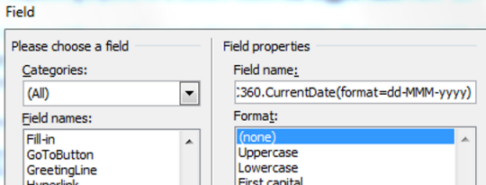
The most important option is format=. The specification following the = is standard .Net formatting for DateTime.
There are both standard and custom formats.
- Standard formats: Preferred format. See: https://msdn.microsoft.com/en-us/library/az4se3k1(v=vs.110).aspx. If no format is supplied, standard formatting is used.
- Custom formats: See, https://msdn.microsoft.com/en-us/library/8kb3ddd4(v=vs.110).aspx. If no format is supplied, standard formatting is used.
- Timezone=: The value can be either utc or custom. If the value is utc, the date and time is shown in UTC (Greenwich Mean Time). If the value is custom, the date and time is shown in the local time zone of the end user. If a time zone option is not supplied, the time zone defaults to UTC.
- Separate multiple options with a semicolon.