
Selecting a Brush
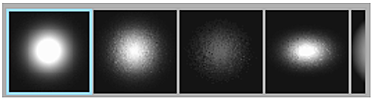
A number of predefined brush types are available in Paint including round, square, and elliptical brushes of various sizes and edge softness. The cursor has the same appearance regardless of brush type. Each brush has its own icon in the Brushes window. The white portions of the brush icon indicate where the paint will be applied on the image. Only one brush can be active at a time.
To select a brush, scroll through the Brushes window by clicking the Brushes window and dragging left or right, the click a brush to select it. The selected brush is highlighted by a blue outline.
Using the Large Canvas
In Large Canvas mode, almost the entire image window is available for painting, but not all Paint options are available. You can still change the brush characteristics, medium, and show options. You can also save, restore, and wipe the canvas. To display the large canvas:
- Click Paint.
- Click Canvas.
- Swipe the cursor anywhere on the right edge of the screen, or press Esc to toggle between the large canvas and Paint menu.