Using HumanIK for Quadrupeds
You can use HumanIK to control the movements of quadrupeds in exactly the same way as you control bipeds, provided that:
- The skeletons of your quadruped characters are similar enough to a biped skeleton that they contain at a minimum all the Nodes required by HumanIK for an HIKCharacter.
- You put some extra care into the initial characterization you create for your quadruped's skeleton. The quality and stability of the results produced by the solver depend in large part on the attention you put into the characterization process. The topics in this section provide some important general recommendations for quadruped characters, as well as some specific guidelines for particular species.
There is no need to explicitly activate quadruped solving for a character. Apart from the differences in characterization, you use exactly the same process to carry out an IK solve or to retarget animations for quadruped characters as you do for biped characters.
From a bio-mechanical perspective, the results of the HumanIK IK solver are typically not as accurate for quadrupeds as they are for bipeds. However, the solver should still be able to produce results that are realistic enough for you to populate a game environment with a wide array of believable quadruped animals based on a minimal library of FK animations (as few as a single walk animation and a single idle animation). You can use all the dynamic IK controls provided by the HumanIK API to layer additional dynamic movements over these base animations, such as using the floor contact system to adapt to the local geometry, using Reach to implement attacking with a foreleg, using a LookAt controller to swivel the animal's head and upper body, etc.
Setting up realistic quadrupeds can be challenging; as always, remember that Autodesk support is standing by to answer your questions regarding quadrupeds and their characterization requirements. If you feel unable to properly characterize one of your specific quadruped creatures, please contact Autodesk support with details, and ideally with an FBX file that contains your model or its skeleton, and an engineer will be happy to assist you. See Support.
The quadrupeds example
This release includes a working code example that demonstrates how to set up several different types of quadrupeds for use with HumanIK, each of which has slightly different characterization requirements due to differences in skeletal structures.
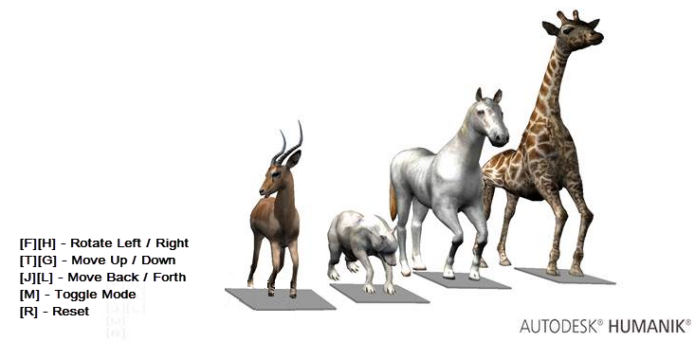
For more information on building and using the HumanIK samples, see HumanIK Samples.
Before you try to set up your own quadruped characters, it is highly recommended that you look through the code of this sample to understand how the various animals are set up and animated, and try out the quadruped example to view the way the differences in characterization produce different IK solutions.
Characterizing quadrupeds
The characterization workflow is the same for quadrupeds as it is for bipeds: you can set up your quadruped's characterization either programmatically or visually, as explained under Initialization.
The skeletons of real-life quadrupeds are typically quite different from human skeletons, and even from quadrupeds of other species. You must take these differences into account when setting up your characterization as summarized in the following sub-sections, especially when choosing the mappings between the joints in your characters' skeletons and the nodes understood by the HumanIK solvers.
In addition, see the other topics in this section for detailed recommendations on characterizing particular species: horses, giraffes, canines such as dogs and wolves, and antelopes such as impalas.
It is generally recommended that you check your characterization by using the verbose build of the HumanIK libraries, since this build validates your characterization and provides helpful hints and diagnostic information when your characterization is invalid—for instance, if the quadrupeds limbs are not properly aligned with a specific axis or if the spine is not close enough to the vertical axis. Do not try to use the IK solver until the verbose build indicates that your characterization is acceptable. For additional information, see Logging Debug Messages.
Neutral stance requirements
Before using your quadruped character, you must characterize its geometry by providing the position and rotation of each of its Nodes in the same kind of neutral stance you use for your biped characters. See Overview. Although this stance is obviously awkward and untenable for a quadruped, you must set up your character this way in order to provide HumanIK with your character's skeletal structure and the dimensions of its body parts.
The images below show an equivalent characterization created in MotionBuilder (on the left) and programmatically in C++ (on the right).

The following requirements for the neutral stance of a quadruped are the same regardless of species and regardless of how you create your characterization:
- The character must be facing along the positive direction of the Z axis.
- The bones that make up the spine must always be aligned to the vertical Y axis.
- The head must be directly above the hips, within 5 degrees of vertical. The bones in the neck may be offset from the vertical if necessary.
- The hind legs must always be aligned to the vertical Y axis. and must be in full extension from the hips to the base of the foot. The toes of the hind hooves or paws should point to the front (the positive direction of the Z axis). The soles of the hind hooves or paws should be perfectly horizontal, in order to produce the best possible floor contact results.
The forelegs have different requirements for their axis orientations, depending on how you create your characterization:
- in MotionBuilder: The character's forelimbs must be aligned vertically along the Y axis, with the hooves
or paws pointing toward the ground.
Pay careful attention to the roll rotation of the joints: it is important that the elbows fold around the X axis, with the elbow pointing towards the character's back. When the elbow joints bend, the forelegs must not deflect from the (Y,Z) plane. If the forelegs are not set up this way, the IK solver could make the animal's legs fold sideways.
The toes of the hooves or paws should point to the front (the positive direction of the Z axis). The soles of the hooves or paws should be perfectly horizontal.
- in C++, Maya, or the Characterization Tool: The character's forelimbs must be aligned horizontally along the X axis, exactly
as you would set up a biped in a T-stance.
Pay careful attention to the roll rotation of the joints: it is important that the elbows fold around the Y axis, with the elbow pointing towards the character's back. When the elbow joints bend, the forelegs must not deflect from the (X,Z) plane. If the forelegs are not set up this way, the IK solver could make the animal's legs fold sideways.
The toes of the hooves or paws should point to the front (the positive direction of the Z axis) or straight upwards (the positive direction of the Y axis). The soles of the hooves or paws should be perfectly vertical, in order to produce the best possible floor contact results.
Bone mappings
Mapping most of the bones in your character's skeleton is relatively straightforward, and analogous to the typical bone mappings for bipeds.
However, for the hind legs and forelegs, you have two principal mapping options. These options produce different amounts of flexibility for the joints in the leg chains, which can in turn affect the animation and skinning behavior of your characters. Which option you should choose depends on the characteristics of the species you are animating and the quality of the results you obtain; you can experiment with both methods and choose the one that produces the best results.
- You can map the skeleton's knee joints to the LeftKneeNodeId and RightKneeNodeId, and map the skeleton's talus bones (ankle bones) to the LeftAnkleNodeId and RightAnkleNodeId. This straightforward approach is generally suggested for animals such as dogs and horses.
- Alternatively, you can map the skeleton's talus bones (ankle bones) to the LeftKneeNodeId and RightKneeNodeId, and invert the bending axis of the knee joints (see Reversing Knees and Elbows). This approach is generally suggested for animals such as giraffes and impalas.
If you choose this approach, you would typically map the very last joints in the legs (i.e. the joints that control the orientation of the soles of the hooves) to the LeftFootNodeId and RightFootNodeId. The joints immediately before this last Node should be mapped to the LeftAnkleNodeId and RightAnkleNodeId.
- For some species, you might want to map the carpal bones of the skeleton to the LeftCollarNodeId and RightCollarNodeId in HumanIK; this is suggested for graceful animals such as impalas.
- Alternatively, you can map the carpal bones to the LeftElbowNodeId and RightElbowNodeId; this is suggested for animals such as horses.
Setting up floor contact
You can use the default floor contact engine built in to HumanIK to make your quadrupeds adjust the positions and rotations of their hooves or paws to match the terrain. For details on the built-in floor contact system, see Foot and Hand Contact.
In most cases, you will want to use the "hoof" contact type for both the hands and feet of your quadruped. For example:
HIKSetPropertyValue(props, HIKHandContactTypeId, 3);    // Hoof contact type
HIKSetPropertyValue(props, HIKFootContactTypeId, 3);    // Hoof contact type
The built-in floor contact system is relatively fast to set up, consumes relatively little CPU, and produces results that are good enough for most uses. However, it is only capable of altering the placement of the Nodes that make up the character's limbs. You may find that the realism of the final pose improves when you also adjust the character's chest or hips in response to the placement of the ground planes. For example, the Quadrupeds sample supplied with HumanIK applies some Reach T and Reach R to the feet and chest in order to engage the whole body in responding to the changing position of the floor. Although this consumes some extra CPU resources, it may be worth it to achieve better looking results.
Using quadruped offsets
With biped characters, you can retrieve and use the default stance any time you need a neutral starting position for your character, by calling the HIKGetDefaultState() function. However, because this T-stance is typically not a very useful neutral pose for quadrupeds, HumanIK offers a function, HIKAddQuadripedOffset(), that automatically offsets the rotation of several Nodes in order to convert the T-stance into a neutral pose that is more appropriate for a quadruped.
HIKCharacterState * MyQuadrupedState = HIKCharacterStateCreate(MyQuadrupedChar, &malloc);
HIKGetDefaultState(MyQuadrupedChar, MyQuadrupedState);
HIKAddQuadripedOffset(MyQuadrupedChar, MyQuadrupedState);
For the exact offsets applied by this function around each axis, see the function description.
You can undo the addition of these offsets to an HIKCharacterState by calling the analogous HIKSubQuadripedOffset() function.
 Except where otherwise noted, this work is licensed under a Creative Commons Attribution-NonCommercial-ShareAlike 3.0 Unported License. Please see the Autodesk Creative Commons FAQ for more information.