Overview
This section describes some of the key objects and concepts involved in using HumanIK.
HIKCharacters
Fundamentally, HumanIK acts on characters. Each character that you want to be controlled in whole or in part by the HumanIK solvers must be represented by an HIKCharacter object. This HIKCharacter is a representation of a bipedal or quadrupedal form specific to HumanIK and optimized for use with the HumanIK bio-mechanical model.
Each HIKCharacter contains a set of joints, known as Nodes. Each Node supported by HumanIK is pre-defined to correspond to a specific part of a humanoid skeleton. For example, one Node represents the elbow of the left arm, another Node represents the wrist of the left arm, another the first joint of the thumb, etc.
HumanIK supports over 170 different pre-defined joint types, listed in the HIKNodeId enumeration. Fifteen of these Node IDs are mandatory: every HIKCharacter must contain these mandatory Nodes at a minimum. In addition, you may or may not choose to use other optional Nodes in your HIKCharacters, depending on the joints in your game character’s skeleton and the precision you expect from the HumanIK solvers. For detailed information to help you decide which HumanIK Node best represents each joint in your game character’s skeleton, see Mapping Joints to HumanIK Nodes and Effectors.
Character Geometry
Not every character with the same set of joints has those joints in the same places. For example, taller characters will likely have longer legs and arms than shorter characters, female characters might have wider hips than male characters, etc.
Each HIKCharacter maintains a set of information about the placement of each of your character’s joints when standing in a neutral T stance. For example:
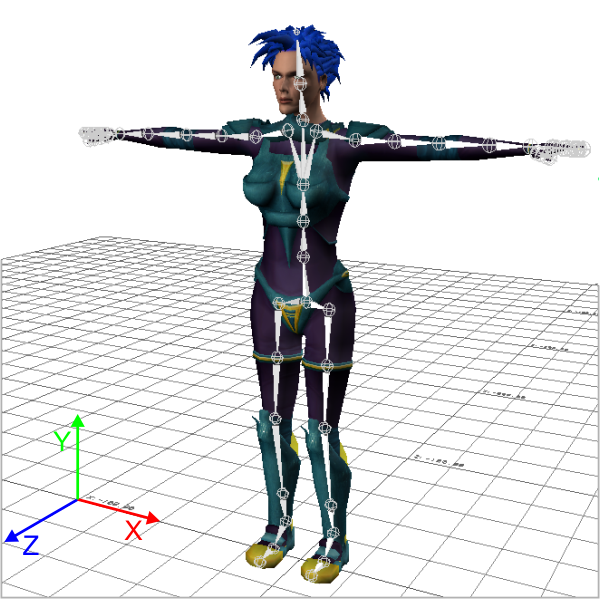
For details, see The Default T-Stance.
Setting up this default geometry for your character is a process called characterization. This characterization can be done programmatically, using calls to functions provided in the HumanIK API to set the appropriate translation and orientation to each of your character’s Nodes. Alternatively, you can export your characterization from a visual content creation tool such as Maya or Softimage. You can read more about this process under Initialization.
HIKCharacterStates
Every one of the Nodes in your HIKCharacter can have a certain position and rotation at a given time. When taken together, these positions and rotations define a complete stance or pose for the character. An HIKCharacterState is an object that stores a single position value and rotation value for each Node of an HIKCharacter, thereby storing a pose for that character.
The HumanIK solvers use these HIKCharacterStates both as input and as output:
- In order to call a HumanIK solver, the initial pose of the source character’s skeleton is typically provided in an HIKCharacterState. You are expected to set the position and rotation of each Node in this HIKCharacterState based on the state of the character model or animation in the game engine in the current frame.
- Once the HumanIK inverse kinematics or retargeting solver has generated a final desired pose for a character’s skeleton, it saves the target position and rotation of each Node in an HIKCharacterState. You are expected to retrieve these positions and rotations from the generated HIKCharacterState and re-apply them to your character model or animation in the game engine.
HIKEffectorSetStates
Effectors define the desired position and rotation for different parts of your character’s body. They are used in sets called HIKEffectorSetStates, each of which defines a coherent set of goal points for your character’s limbs at a given moment in time.
HIKEffectorSetStates do not contain separate Effectors for every single Node in your character’s skeleton. Instead, they contain a set of Effectors that represent the semantic elements of the biped or quadruped form. For example, there is a single Effector for the end of each finger on the left hand, an Effector for the left wrist, and an Effector for the left elbow. However, many different skeletal configurations are possible for your character’s hands, with different numbers of Nodes in each finger, with or without in-hand Nodes, with or without roll Nodes in the arm, etc. Based on your character’s geometry, the inverse kinematics solver maps the desired translation and orientation represented by an Effector to the relevant parts of the skeleton.
For example, if you move the Effector for the tip of the left index finger toward the character’s wrist, the inverse kinematics solver will attempt to place the finger Effector at its desired position, moving other Nodes in the hand if necessary. If the index finger has multiple Nodes, this will result in the finger curling.
The HumanIK inverse kinematics solver balances the needs of all Effectors in the HIKEffectorSetState you provide, making a "best fit" that gets as many of the character’s limbs as possible to the positions and rotations indicated by their corresponding Effectors.
Each Effector in the HIKEffectorSetState can be active or inactive, and can place other special constraints on the solver, such as Reach, Pull and Resist. See Reach, Pull, and Resist. For a list of Effectors understood by the HumanIK bio-mechanical model, see the HIKEffectorId enumeration.
HIKPropertySetStates
HIKPropertySetStates contain a set of parameters that configure the inverse kinematics and retargeting processes. Each time you use the inverse kinematics or retargeting solver, you must provide an HIKPropertySetState; however, you can do as much or as little customization as you like to the default values of its parameters.
HIKPropertySetStates are not dependent on the way your characters are set up; all HIKPropertySetStates contain the same list of parameters. You can use the same HIKPropertySetState for solving characters with different skeletal structures and geometry, provided of course that you want the solver to behave in the same way for both characters.
For details on the properties you can configure in each HIKPropertySetState, see Character Properties.
Topics in this section
 Except where otherwise noted, this work is licensed under a Creative Commons Attribution-NonCommercial-ShareAlike 3.0 Unported License. Please see the Autodesk Creative Commons FAQ for more information.