
Point Locators Menu Settings
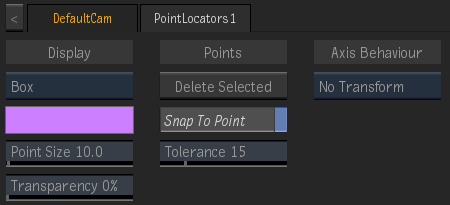
Point Locators Display option
Select how the point locators are displayed in the image.
Point Locators Colour
Displays the colour of the point locators.
Point Size field
Displays the size of the point locators.
Transparency field
Displays the transparency level of the point locators.
Delete Selected
Click to delete selected points.
Snap To Point
Enable to snap an object automatically to a point in the point locators object. Use Shift and drag the object towards the point locator.
Snap Tolerance field
Displays the minimum distance between the object and the point locator for snapping to occur.
Transform option
Select how an attached object behaves based on the movement of the point locators.
| Select: | To: |
|---|---|
| No Transform | Apply no transformation on the attached object. |
| Plane Transform | Align an object based on the average plane of the maximum number of points. |
| Centroid Transform | Align an object to the centre of the point locators. |