
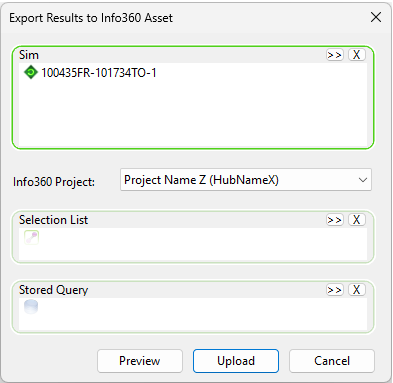
This dialog is used to export results to Info360 Asset.
The dialog is displayed by selecting
Export  To Info360 Asset from the context menu of simulation results. See
Exporting results to Info360 Asset.
To Info360 Asset from the context menu of simulation results. See
Exporting results to Info360 Asset.
| Option | Description |
|---|---|
| Sim[ulation] |
For identifying one or more simulations to export.
|
| Info360 Project |
Allows you to select an Info360 project from the drop-down list.
Note: The hub name is in parenthesis.
Refer to Prepare for Info360 for more information. |
| Selection List |
You can reduce the scope of the export.
If a selection is not chosen, the export will be carried out for the whole network. |
| Stored Query |
You can add a stored query, if applicable.
|
| Preview | Opens your selection in a new preview window. |
| Upload | Uploads your simulation results to your Info360 Asset tenant. |
 (Browse) button to search for a simulation.
 (Delete selection) button can be used to delete items from the box.