
Assigns class, drawing, and project properties to a new annotation style based on an existing annotation style or modifies an existing annotation style.
Access Method
 Ribbon: Click Home tab
  Project panel Project Manager Project Setup Plant 3D DWG Settings Plant 3D Class Definitions node
 Shortcut menu: Project Manager Right-click a project icon Click Properties.
Right-click a project icon Click Properties. Command entry:
projectsetup
Command entry:
projectsetup 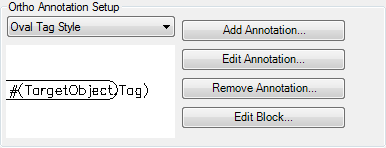
Ortho Annotation Drop-down List
Displays the names of the available annotation styles for the selected model object.
- Add Annotation
-
Displays the Symbol Settings dialog box, where you can add an annotation style.
- Edit Annotation
-
Displays the Symbol Settings dialog box, where you can modify an annotation style’s settings.
- Remove Annotation
-
Deletes an annotation style.
- Edit Block
-
Displays the AutoCAD Block Editor, where you can edit the annotation behavior.
Note: If you are unfamiliar with using the Block Editor, see “Create and Use Blocks” in the AutoCAD Help system.