• Help Home
  • Quick Links
    • What's New
    • Release Notes
    • Essential Skills Video Tutorials
    • Essential Concepts
    • The Alias Workspace
    • Keyboard Shortcuts
    • Subdivision Modeling tutorials
  • English (US)
    1. English (US)
    2. 简体中文
    3. 日本語
    4. 한국어
Alias 2026
    • Alias What's New
      • What's New in Alias 2026
      • What's New in Previous Releases
    • Alias Release Notes
    • Tutorials
    • Interface Reference
    • Tool Palette Reference
    • Menus Reference
      • File menu
      • Edit menu
      • Delete menu
      • Layouts menu
      • Display menu
      • Layers menu
      • Visualization menu
      • Animation menu
      • Windows menu
        • Palette
        • Shelves
        • Control Panel
        • Gather Floating Windows
        • Workspace Bar
        • Canvas Lister
        • Markup Lister
        • Construction Plane Editor
        • Cross Section Editor
        • Deviation
        • Information Window
        • Stages
        • Reference Manager
        • Object Lister
        • Layer Bar
        • Categories Lister
        • Selection Sets Lister
        • History Visualizer
        • History View
        • SBD
        • Variant Lister
      • Preferences menu
      • Utilities menu
      • Help menu
    • File Format Reference
    • VRED Renderer
    • Live Referencing
    • Alias Dynamo User Guide
    • Flow Production Tracking for Automotive Design
    • Form Explorer for Alias User Guide
    • NavPack Design User Guide
    • Environment Variables
    • Alias Programmers’ Interfaces (API)
    • Alias Installation
    • Legacy Getting Started
    1. Menus Reference
    2. Windows menu
    3. Gather Floating Windows
    Share
    • Email
    • Facebook
    • Twitter
    • LinkedIn

    Gather Floating Windows

    Moves all open working Tool Editors to the current screen. This is useful if you work with two or more monitors and several editors and palettes open as floating windows on different screens.

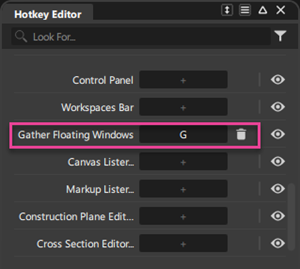
    Tip: You can set a hotkey for this feature for quick access.

    Parent page: Windows menu

    Was this information helpful?

    Except where otherwise noted, this work is licensed under a Creative Commons Attribution-NonCommercial-ShareAlike 3.0 Unported License. Please see the Autodesk Creative Commons FAQ for more information.

    • Privacy Statement
    • Legal Notices & Trademarks
    • Report Noncompliance
    • © 2025 Autodesk Inc. All rights reserved