
This dialog is used to export risk analysis results from
Risk Analysis Runs to CSV format, and is displayed when you right-click on a
Risk Analysis Results object and select Export to CSV from the context menu.
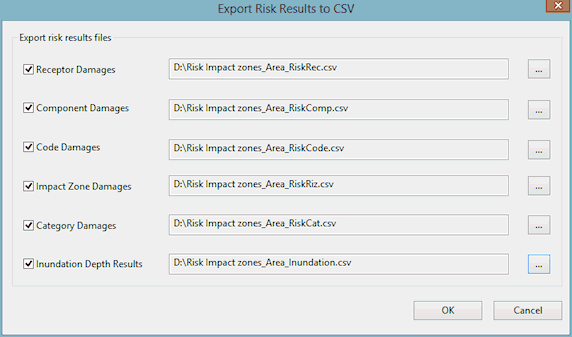
Dialog description
| Item | Description |
|---|---|
| Receptor Damages | If checked, exports the table of damage values for each Damage Receptor. |
| Component Damages | If checked, exports the table of damage values for each damage function component. |
| Code Damages | If checked, exports the table of damage values for each damage function code. |
| Impact Zone Damages | If checked, exports the table of damage values for each risk impact zone. |
| Category Damages | If checked, exports the table of damage values for each risk impact zone category. |
| Inundation Depth Results | If checked, exports the table of inundation depths tabulated by Damage Receptor ID against return period. |

|
Browses for a location to save the exported CSV files to. |
| OK | Exports the selected files, in CSV format, to the chosen locations. |
| Cancel | Cancels the export operation. |