
• Help Home
TruComposites - Standard
    • TruPlan
      • About Autodesk TruPlan
      • Getting Started with TruPlan
      • TruPlan Best Practices
      • About the TruPlan Browser
      • Working with File Import
      • Working with Updates to Objects
      • Working with Points, Curves, and Projections
      • Working with Rosettes
      • Working with Triads
      • To Create a Layup
      • To Create a Ply
      • About Sub-Plies
      • Working with Sub-Plies
      • Working with Sequences
      • To Create a Plane
      • Working with Tessellation
      • About Strategies
      • Working with Flat Patterns
      • Working with Analyses
      • Working with Material Properties
      • Working with Packaging
      • Working with Manufacturing Configurations
      • Working with Nesting Output
      • Working With Laser Projectors
      • Working with Laser Output
      • Working with Other Autodesk Applications
      • Working with Thickness Offsets
      • TruPlan Reference
      • TruPlan Examples
      • TruPlan Glossary
    • TruLaser
    Share
    • Email
    • Facebook
    • Twitter
    • LinkedIn

    View Points

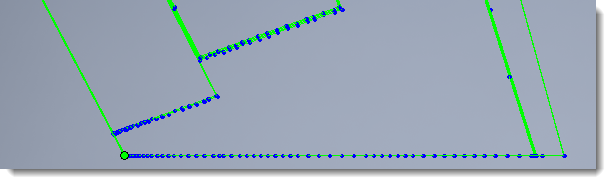
    This display mode toggles on/off the display of all laser points defined in your TruLaser browser. Along with the points themselves, any normal vectors can also display (see Project Using Normal Vectors for details). If you use Single Group selection mode, the ability to see points is useful when trying to anticipate flicker.
    Parent page: Viewing Laser Data

    Was this information helpful?

    Except where otherwise noted, this work is licensed under a Creative Commons Attribution-NonCommercial-ShareAlike 3.0 Unported License. Please see the Autodesk Creative Commons FAQ for more information.

    • Privacy Statement
    • Legal Notices & Trademarks
    • Report Noncompliance
    • © 2025 Autodesk Inc. All rights reserved