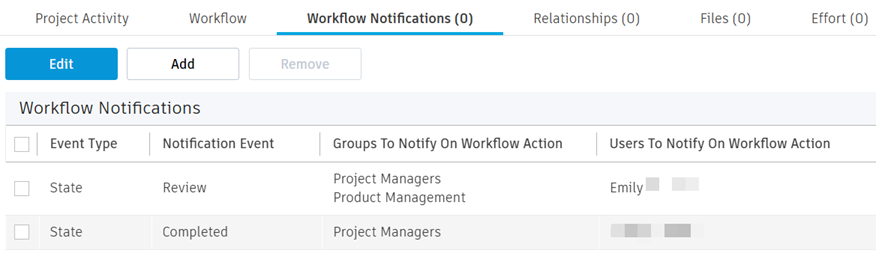
Project activity workflow notifications
For users with Fusion connected sites, references to the 'Items' workspace should be the 'Components' workspace.
The Workflow Notifications tab of an activity enables you to send notifications as emails to specific people when certain states and transitions on the activity are achieved. This can help other team members know when they have work pending or project managers keep track of project progress. For example, you might create a notification that is sent to a reviewer when it is time for them to review the work done in an activity.
To create a workflow notification:
Click Add.
In the Event Type column, select State or Transition.
In the Notification Event column, select the event that will trigger the notification.
- If you chose State as the event type, this is a drop-down list of states in the workflow.
- If you chose Transition as the event type, this is a drop-down list of transitions in the workflow.
(Optional) In the Groups to Notify on Workflow Action column, select one or more groups.
(Optional) In the Users to Notify on Workflow Action column, select one or more team members.
Click Save.
Repeat the preceding steps to add more than one notification.